The Fake Storage Full Email Hiding on Google

An email from “Cloud Secure” is going around. It says your storage is 97% full, your payment failed, and your photos get deleted today unless you pay. The deadline is fake, the company is fake, and below you will learn how to spot the email and check your real storage in under a minute.
Who is Affected?
Anyone who pays for online photo storage, such as iCloud (Apple), Google One, Dropbox or Microsoft OneDrive.
Parents and grandparents with years of family photos stored online. The scammers count on that fear.
People who look after the email for a small office, church or club and get this email at a shared address.
You do not need to have any of these services to get the email. The scammers send it to everyone and hope it lands on someone who does.
How the Scam Works
This is the email we received.
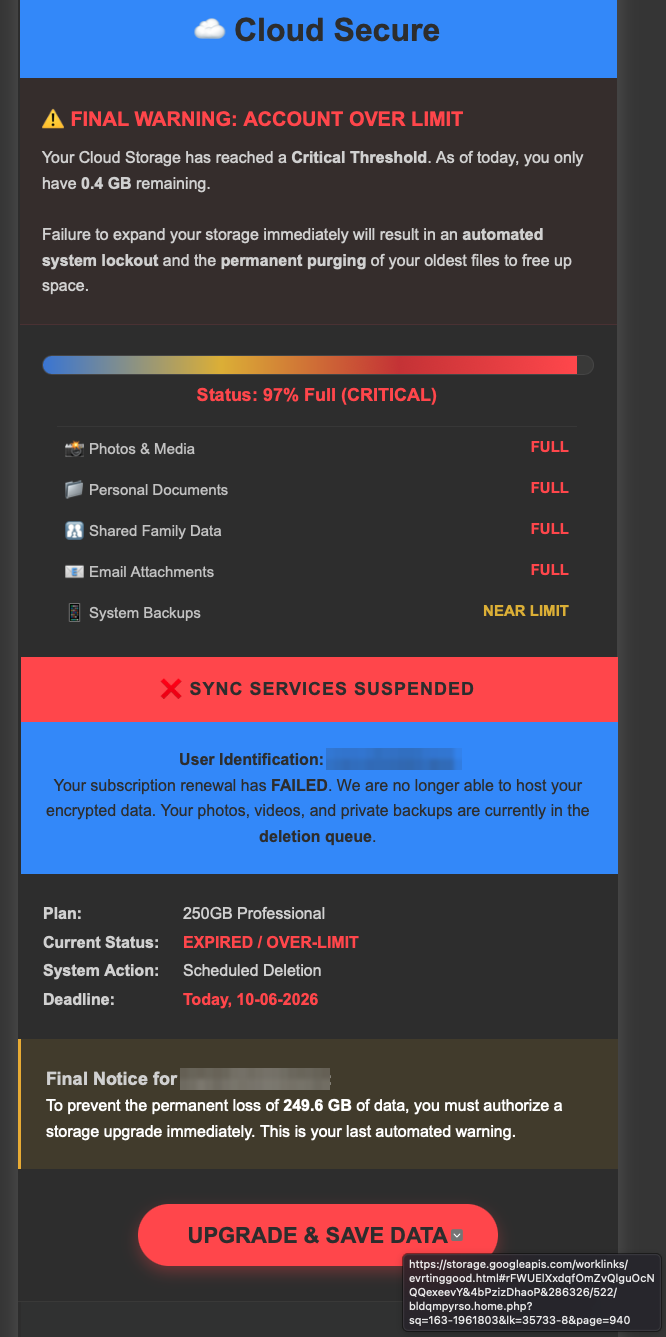
The email opens with a made-up brand, “Cloud Secure”, and a colour bar stuck at 97% full. Every folder says FULL: photos, documents, “Shared Family Data”, email attachments.
Halfway down, the email changes its story. Now your storage is full and your subscription renewal has failed. Your files sit in a “deletion queue”.
A deadline of “Today” (with the actual date filled in) tells you there is no time to think.
The email greets you by your email username, the part before the @. A real company uses your name, because it knows it.
The big red “Upgrade & Save Data” button leads to a page that asks for your card number. The scammers keep the card details, and some use them right away.
The clever part is the link. If you hover your mouse over the button, the address starts with storage.googleapis.com. That is a real Google service that anyone can rent space on, much like renting a mailbox. The scammers put their fake payment page there. Spam filters and quick glances see “google” and let it through. We covered this trick in Why Scam Links Now Come From Places You Trust.
What to Look Out For
A storage company you never signed up for. Apple says “iCloud”. Google says “Google One”. Nobody you pay is called “Cloud Secure”.
Your username in place of your name, such as “Final Notice for jsmith1962”.
A deadline of “today”, or a promise of “permanent loss”.
Two problems in one email (storage full and payment failed). Real billing emails stick to one.
A button that leads to
storage.googleapis.com, a long string of random letters, or anything other than apple.com, google.com, dropbox.com or microsoft.com.Emoji and coloured warning boxes. Real storage reminders from Apple and Google are plain and calm.
How to Stay Safe
Right now, on your phone
Do not tap the button. Do not reply.
Check your real storage in your settings. On an iPhone, open Settings, tap your name, then tap iCloud. On an Android phone, open the Google One app or Settings, then Google. If the number there is fine, the email is fake.
In Gmail, tap the three dots on the email and choose “Report phishing”. Google explains the steps here. This helps Google block the next one.
If you already clicked or paid
Call the number on the back of your bank card. Tell them you entered your card on a scam page. They can cancel the card and send a new one.
If you typed a password on the page, change that password today. If you use the same password anywhere else, change it there too.
Report it. In Canada, use the Canadian Anti-Fraud Centre. In the US, use the FBI’s IC3. Reports help police link cases together.
If you manage email for a small office or church
Send everyone a two-line note: “There is a fake storage-full email going around. We never pay for storage through an email link.”
Turn on two-step sign-in (a code sent to your phone at sign-in) for every account in your Google or Microsoft admin console. It stops a stolen password from opening the account.
Still not sure if an email is real? Paste it into Dave, our cybersecurity helper, and ask.
Conclusion
Your storage company already lives in your phone’s settings, so check there and leave the email alone. If the email and your settings disagree, trust your settings. To learn the 4-step check that catches emails like this, try How Not to Get Phished.
Want to see another email that hid behind a real company? Read Apple’s Own System Used to Send Phishing Emails, then subscribe to the Phended Security Blog for the next one. Free, no spam.
Never Miss an Alert
New posts like this one, free every week. No spam, unsubscribe any time.
Keep reading
Apple's Own System Used to Send Phishing Emails
A phishing email that really came from Apple, passed every security check, and pushes you to call a scam line about a fake $899 charge.
Why Scam Links Now Come From Places You Trust
Criminals are hosting their scam pages on Google Docs, Microsoft OneDrive, and Canva. Your eyes see a familiar brand. Your instinct says safe. It's not.
The Fake PayPal Bitcoin Charge That Isn't Real
An email shows a $400 Bitcoin purchase on your PayPal account. Panic sets in. You call the number. That's when the real scam starts.